Film news: A Dedicated App for Analog Photographers
A few years back I shared a fledgling project by Vincent Tantardini, the Datafilm app. And the response from all of you lovely people was fantastic. Vincent has been busy improving and updating the app, now known as Frames, a dedicated app for analog photographers. Let’s hear from Vincent himself about Frames.
JCH Community
Four years ago, I shared datafilm with the JCH community, a personal project born from the frustration of juggling notebooks, loose notes, and scattered metadata every time I developed film. I wanted a better way to log my exposures and camera settings, with the eventual goal of matching them to my scans later on. The response from the analog community was warm and encouraging, and thanks to your feedback, that simple tool has grown into something much more refined.
Introducing Frames
Today, I’d like to reintroduce the project under its new name: Frames.
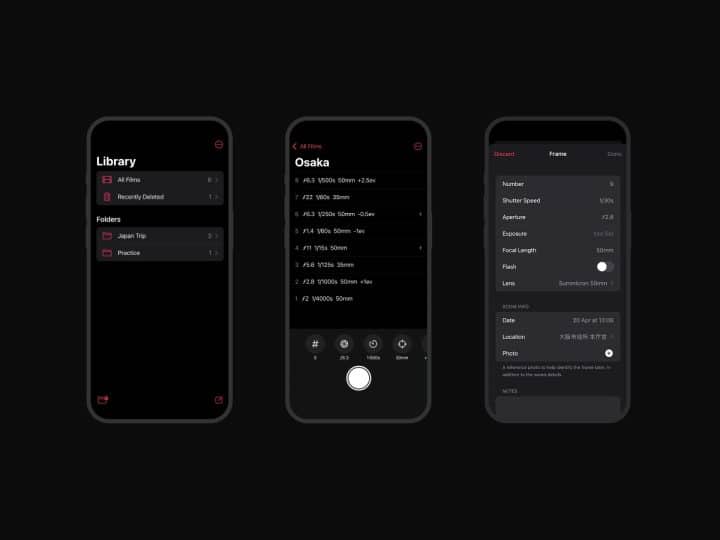
Frames is the spiritual successor to datafilm, rebuilt and redesigned with the same goal: helping film photographers record the details behind each shot, but expanded in every way. It’s a notebook app specifically crafted for analog photography, where each frame you shoot is treated like an intentional record. With Frames, you can easily log your camera, lens, film stock, aperture, shutter speed, focal length, location, and notes. All in a few taps and right at the moment you take the shot.
Built for Film Shooters
Unlike generic note apps or spreadsheets, Frames understands film. It comes preloaded with over 200 film stocks, supports push/pull logging, and even includes metadata fields for flash use, exposure compensation, etc. For rangefinder shooters, you can preload rolls and log discreetly without breaking your rhythm. Everything is designed to feel fast and non-disruptive.
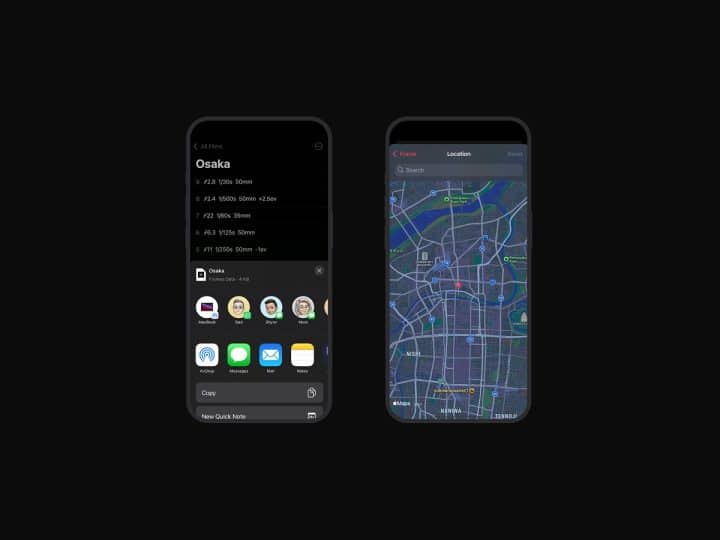
Match Your Notes to Your Scans
What really transformed my own workflow was being able to later sync this data back to my scans. With the macOS companion app, you can import a .frames file from your iPhone, attach the matching JPEGs, and export updated images with all metadata embedded, including shutter, aperture, notes, GPS coordinates, and even the film stock. Your scans become smart files, complete with EXIF-style data, ready for archiving, sharing, or cataloging in Lightroom, Apple Photos or Flickr.
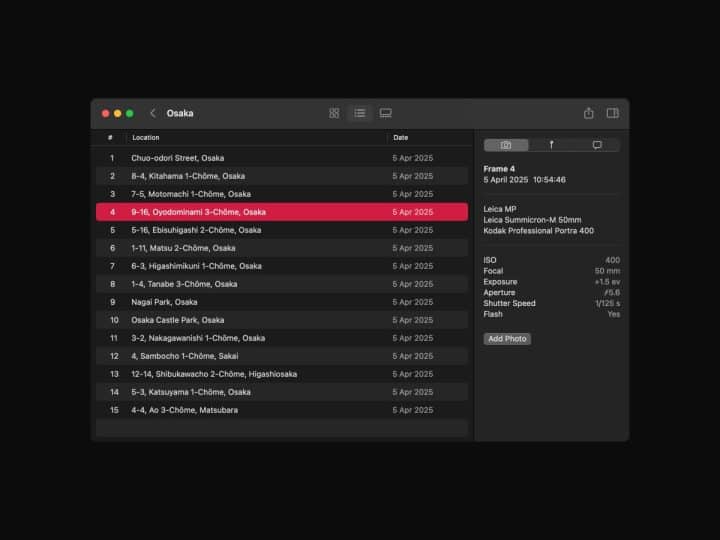
Respecting Your Privacy
I designed Frames to be privacy-respecting: there’s no account system, no cloud syncing, and no tracking. Your data stays on your device, and exporting is completely open, you can get your logs as JSON files for now but other formats are coming soon.
Shaped by the Community
Since that first post on JapanCameraHunter, the analog community has been a big part of shaping the app. From beta testing to feature requests, every update has been driven by actual use in the field. And while digital tools may seem out of place in the world of film, I still believe there’s beauty in bridging both. After all, remembering what you shot and how you shot it is part of the joy of shooting film.
Try Frames
If you’ve been logging your shots with pen and paper, or relying on memory to match settings to scans weeks later, Frames might be worth a look. It’s available now on iOS and macOS.
To learn more about the project, visit the official Frames app website.
You can download Frames on the App Store and the Mac App Store.
Thanks again to Bellamy as well as the community for supporting this journey from the start, happy shooting!
Thank you to Vincent for sharing this with us. Please check it out and share your thoughts, I know he values the feedback.
JCH